Files and Folders application

With Files and Folders, you can manage files and folders on your remote device.

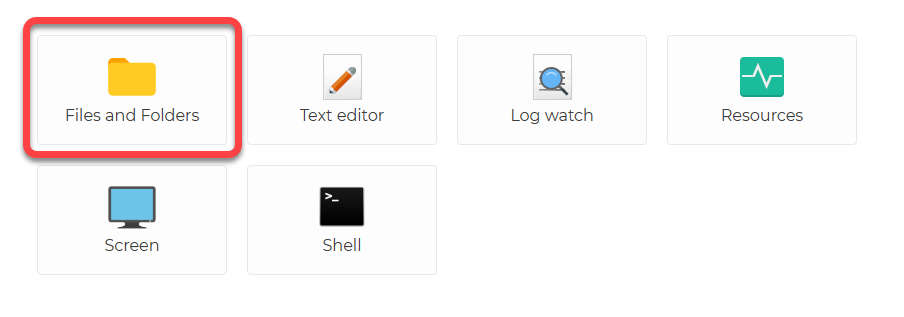
When you are connected to the Agent, applications will appear:
The Files and Folders application looks like this when in use:
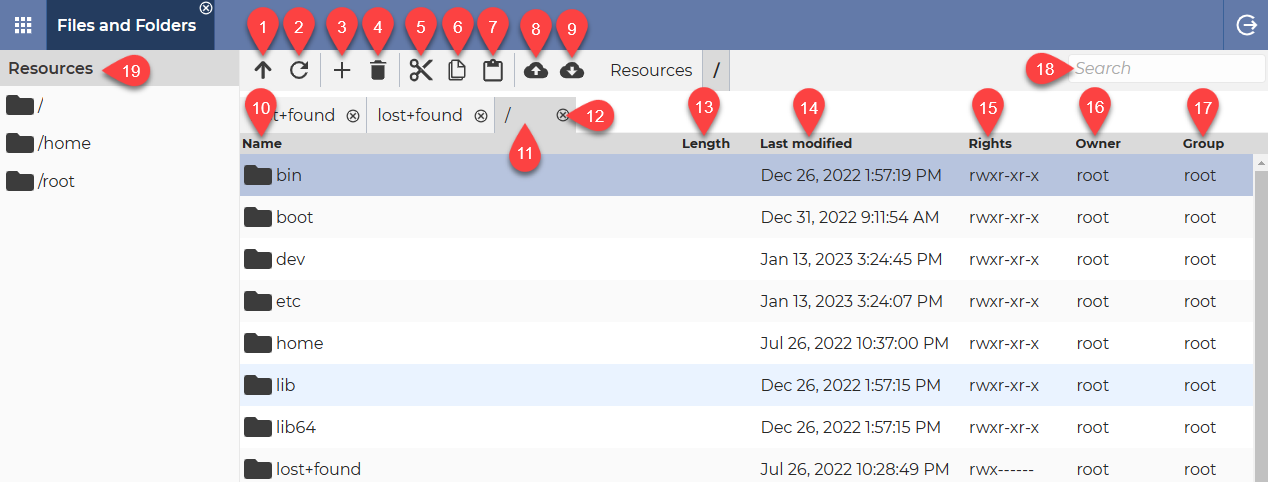
  1. Up → Moves up one folder.
  2. Refresh → Updates the information in folders and files.
  3. New folder → It creates a folder in the current folder.
  4. Delete → Deletes the selected file(s) or folder(s).
  5. Cut → Move the selected file(s) or folder(s) to the clipboard.
  6. Copy → Copies the selected file(s) or folder(s) to the clipboard.
  7. Paste → Paste the selected file(s) or folder(s) from the clipboard.
  8. Upload → It allows you to upload a file from the local device to the remote folder.
  9. Download → Allows you to download a file from the remote folder to the local device.
  10. Name column → This column shows the names of files and folders.
  11. Tabs → You can open multiple tabs at once, allowing you to perform multiple tasks in parallel.
  12. Close Tab button → It can be used to close the given tab.
  13. Length column → This column shows the size of the files.
  14. Last modified column → This column shows the dates when files and folders were last modified.
  15. Rights column → This column shows the rights that apply to the given file or folder.
  16. Owner column → This column shows the Owner of the files or folders.
  17. Group column → This column shows the Group
  18. Search field → This field allows you to browse files and folders. This makes it easier to find the file or folder you are looking for.
  19. Resources list → This list contains the drives for Windows operating systems or the root and User folder for Linux.

💡Hint: You can switch the sort order by clicking on the column names (Ascending order ▲ / Descending order ▼).

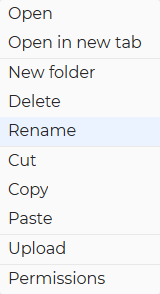
Using the right-click, you can access the context menu (for a folder):
Using the right-click, you can access the context menu (for a file):
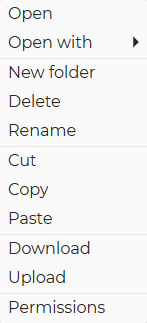
Open → This option opens the selected item.

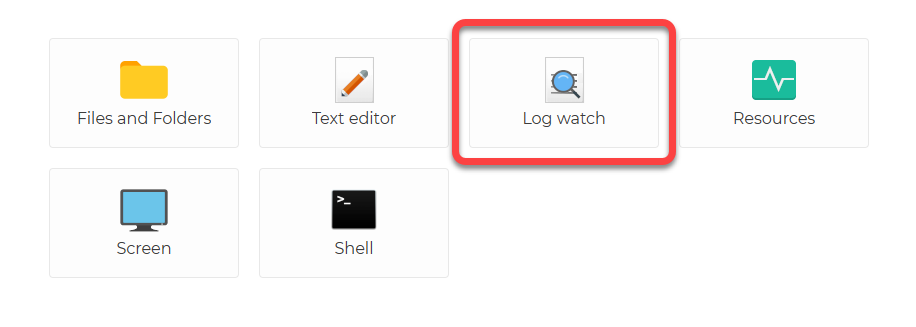
Open with ► → This option allows you to decide whether to open the file using the Text editor application or Log watch application. This option is only available for files.

Open in new tab → This option opens the selected item in a new tab. This option is only available for folders.

New folder → It allows you to create a new folder.

Delete → It can be used to delete the selected item.

Rename → It allows you to rename the selected file or folder.

Cut → It cuts the selected file or folder to the clipboard.

Copy → It copies the selected file or folder to the clipboard.

Paste → It pastes the selected file or folder from the clipboard.

Download → It allows you to download the remote file to the local device.

Upload → It allows you to upload a file to the remote folder.

Permissions → This option allows you to set the following permissions:

  1. Owner → Here you can change the Owner of the file or folder.
  2. Group → Here you can change the Group of the file or folder.
  3. Owner → Here you can change the rights for the Owner (reading, writing, execution)
  4. Group → Here you can change the rights for the Group (reading, writing, execution)
  5. All → Here you can change the rights for All (reading, writing, execution)
  6. Apply permissions to all subfolders and files → If the checkbox is checked, the permissions set above will be applied to all subfolders and files.

Related articles: Applications
Text editor application

You can use the Text editor to create new text files or edit existing ones. To edit a text file, you do not need to download the file and then upload it after editing. You open the file, edit it, save it.

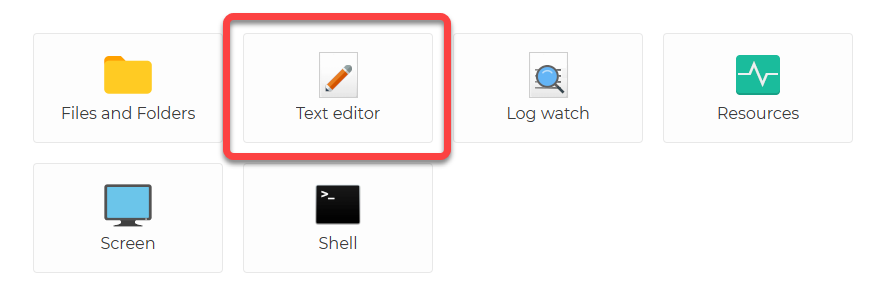
When you are connected to the Agent, applications will appear:

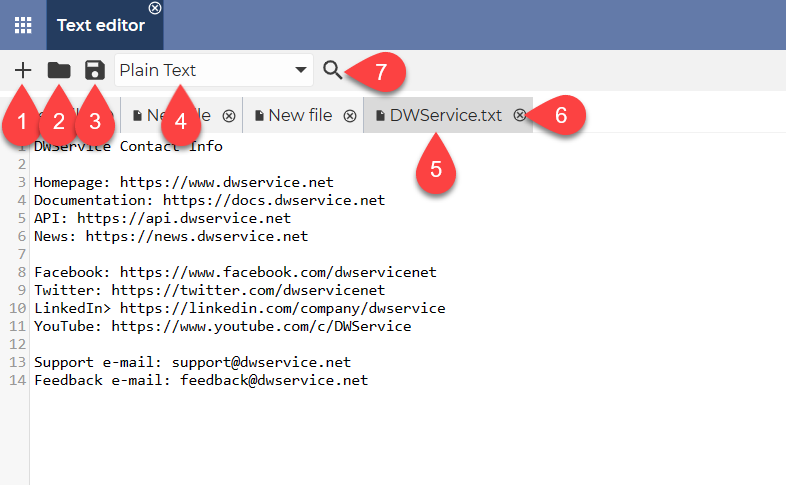
The Text editor application looks like this when in use:

  1. Add file button → Use the Plus sign button to create a new file. A new tab will appear.
  2. Open button → Press the Open button to open a text file from the remote machine. You can also edit the opened file.
  3. Save button → The Save button allows you to save your changes. Using this button will save the changes to the file immediately.
  4. Text format drop-down menu → You can select the type of text file you want to create from the drop-down menu.
  5. Tabs → You can open multiple tabs at once, allowing you to perform multiple tasks in parallel.
  6. Close Tab button → It can be used to close the given tab.
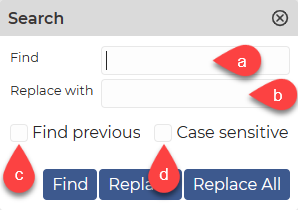
  7. Search button → By clicking on the Search button, you can access the following options:

a. Find field → You can search the text in this field in the text file.

b. Replace with field → You can replace the text in the search field with the text in this field.

c. Find previous checkbox → If the checkbox is selected, it searches backwards in the document.

d. Case sensitive checkbox → If the checkbox is ticked, it differentiates between upper- and lower-case letters. If not checked, upper- and lower-case letters are processed as equals.

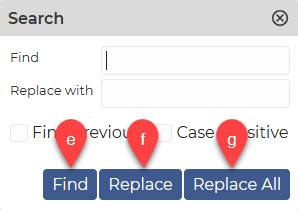
e. Find button → By clicking the Find button, you can start the search for the text you entered in the Find field.

f. Replace button → By clicking the Replace button, you can search for the text you entered in the Find field and replace it with the text you entered in the Replace with field.

g. Replace All button → Clicking the Replace All button will start the search for the text you specified in the Find field and replace any texts found in the document with the text you specified in the Replace with field.

Log watch application

A log file is a text file in which a program (or the system itself) collects information about events. If you want to track changes to a certain log file, you can do so using the Log watch application. You can see the changes in the text file in real time.

When you are connected to the Agent, applications will appear:


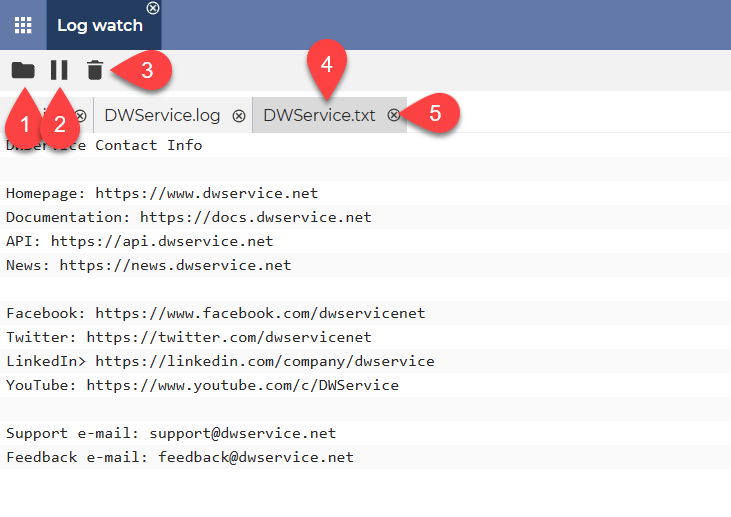
The Log watch application looks like this when in use:

  1. Open → You can open a log file from the remote device that you can monitor.
  2. Pause → You can pause the monitoring of changes to the file.
  3. Delete → Deletes the text on the screen. ⚠️ Important: The file content is not changed; the text is not deleted from the file. The remote file remains unchanged.
  4. Tabs → You can open multiple tabs at once, allowing you to perform multiple tasks in parallel.
  5. Close tab button → It can be used to close the given tab.

Related Articles: Applications

Shell application

The Shell application allows you to run commands on a remote device using a terminal, so you do not need to use the remote device Screen to do this.

⚠️ In case of Agent for Windows, the Shell application uses Windows Pseudo Console (ConPty) technology, so the Shell application has system requirements:

  • For Windows systems  Windows 10 (version 1809 and later) or Windows 11.
  • For Windows Servers  Windows Server 2019 and later.

For systems that do not meet the above requirements, the Shell app will not appear as an application.


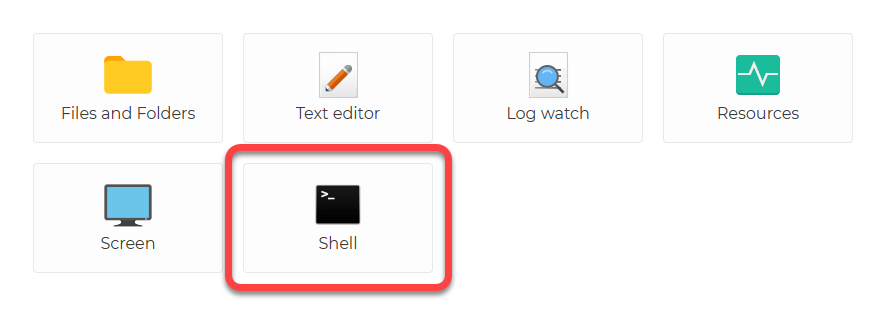
When you are connected to the Agent, applications will appear:

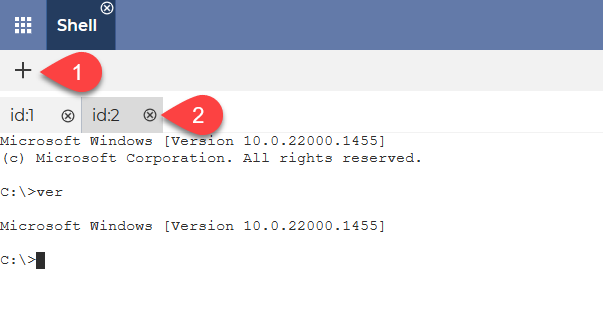
The Shell application looks like this when in use:

  1. Add Shell → Adds a new Shell tab.
  2. Tabs → You can open multiple tabs at once, allowing you to perform multiple tasks in parallel.

Related Articles: Applications

Screen application

The Screen app allows you to view the screen of your remote device. You can also control the remote device, depending on your settings.
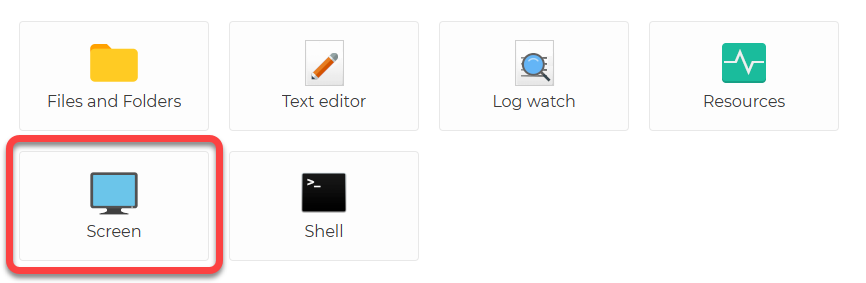
When you are connected to the Agent, applications will appear:

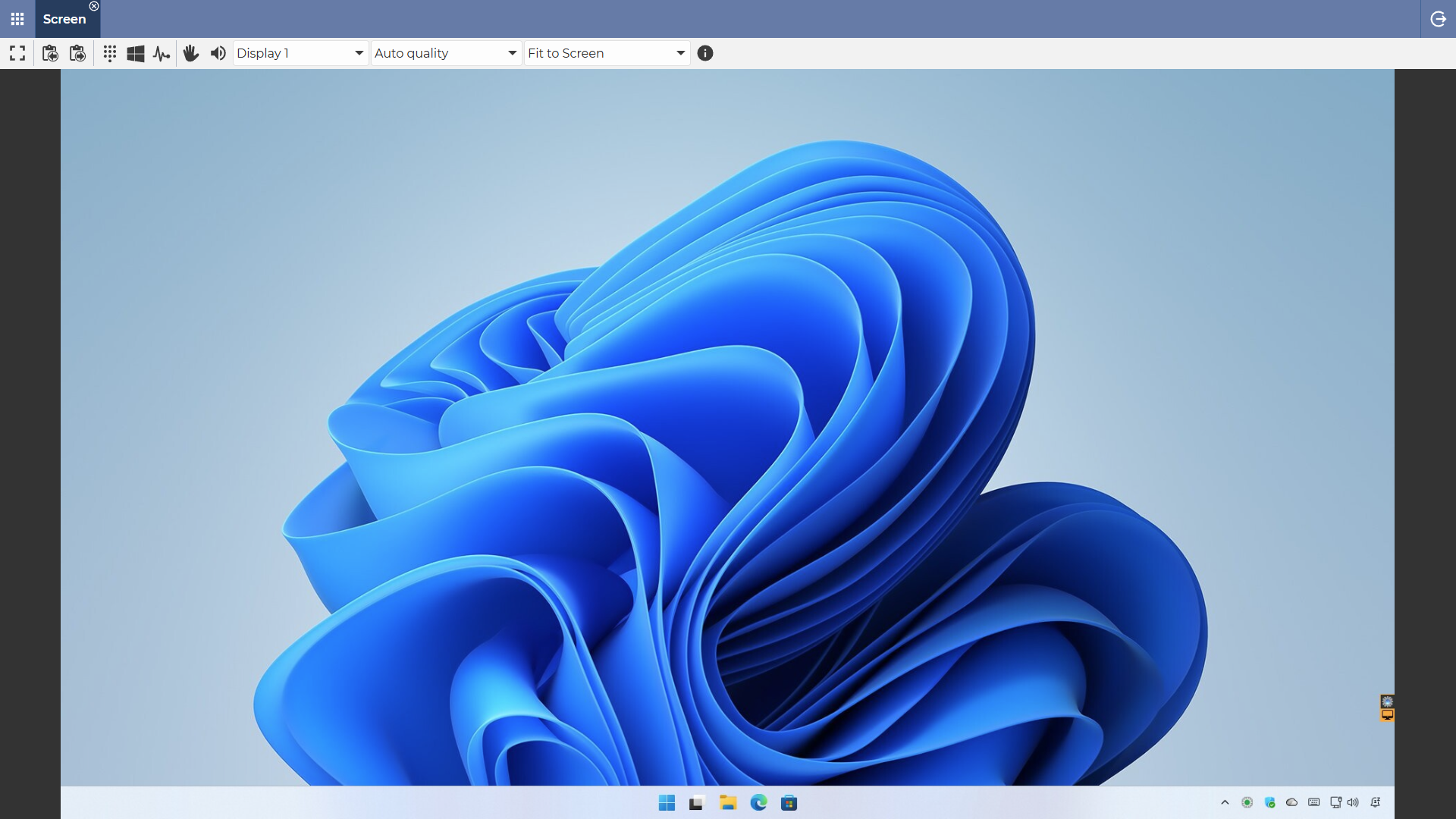
After launching the Screen application, this screen of the remote device appears:

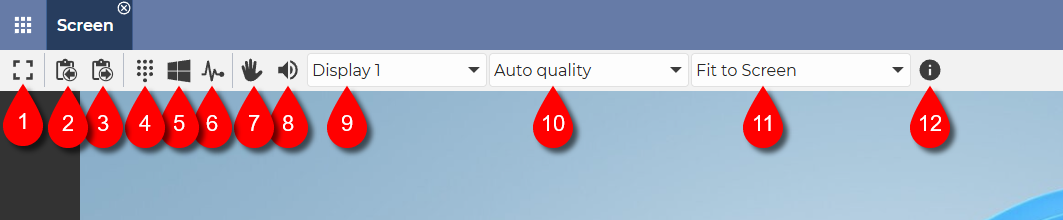
Explanation of the toolbar that appears at the top:

  1. Full-screen mode on/off ⇒ It allows you to switch the full-screen mode on and off.
  2. Copy ⇒ The text selected on the remote device can be copied to the clipboard.
    More information about the Copy function is available here: Copy
  3. Paste ⇒ Text can be pasted from the clipboard to the remote device.
    More information about the Paste function is available here: Paste
  4. Sending keystrokesSends keystrokes to the remote device. DetailsSending keystrokes
  5. Win+Esc (in case of Windows) ⇒ Opens the Start menu.
  6. Ctrl+Alt+Del (in case of Windows) ⇒ Sends Ctrl+Alt+Del keyboard shortcut to the remote device.
  7. Mouse/keyboard enable/disable ⇒ The use of the mouse and keyboard can be disabled or enabled. If disabled, view-only mode is activated.
  8. Audio enable/disable ⇒ It allows you to turn the sound of the remote device on and off.
  9. Screen selection ⇒ If you are using multiple screens, you can use this drop-down list to select the right one.
    Or for example two displays side by side.
  10. Screen quality ⇒ Select the quality that suits your bandwidth from the drop-down list. You can choose from Minimum, Low, Medium, Maximum, Auto.
  11. Screen size ⇒ The screen size can be selected from the drop-down list. A value less than 100% means zoom out, a value greater than 100% means zoom in. Fit to screen adjusts the screen of the remote device to the size of the current window.
    💡You can either select a value from the drop-down menu or enter a value manually (for example: 123%).
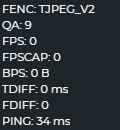
  12. Show/Hide connection info ⇒ It shows information about the quality of the connection.
    More details on the displayed information: Connection info
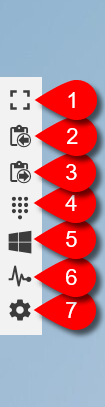
In case of full screen mode, the toolbar appears on the left side of the screen. The toolbar is explained as follows:

  1. Full-screen mode on/off ⇒ It allows you to switch the full-screen mode on and off.
  2. Copy ⇒ The text selected on the remote device can be copied to the clipboard.
    More information about the Copy function is available here: Copy
  3. Paste ⇒ Text can be pasted from the clipboard to the remote device.
    More information about the Paste function is available here: Paste
  4. Sending keystrokesSends keystrokes to the remote device. DetailsSending keystrokes
  5. Win+Esc (in case of Windows) ⇒ Opens the Start menu.
  6. Ctrl+Alt+Del (in case of Windows) ⇒ Sends Ctrl+Alt+Del keyboard shortcut to the remote device.
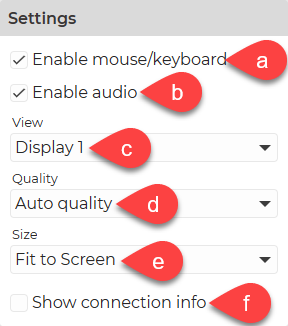
  7. Settings ⇒ The following settings are available:

a. Mouse/keyboard enable/disable ⇒ The use of the mouse and keyboard can be disabled or enabled. If disabled, view-only mode is activated.

b. Audio enable/disable ⇒ It allows you to turn the sound of the remote device on and off.

c. Screen selection ⇒ If you are using multiple screens, you can use this drop-down list to select the right one.
Or for example two displays side by side.

d. Screen quality ⇒ Select the quality that suits your bandwidth from the drop-down list. You can choose from Minimum, Low, Medium, Maximum, Auto.

e. Screen size ⇒ The screen size can be selected from the drop-down list. A value less than 100% means zoom out, a value greater than 100% means zoom in. Fit to screen adjusts the screen of the remote device to the size of the current window.
💡You can either select a value from the drop-down menu or enter a value manually (for example: 123%).

f. Show/Hide connection info ⇒ It shows information about the quality of the connection.
More details on the displayed information: Connection info
Watch our tutorial video on How to use the Screen application:

Installation code

After signing into your personal account and selecting Agents, when you create an Agent, the system will generate a code for the Agent, which you will need to enter when installing the Agent.

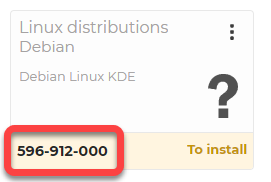
This Installation code is shown in the following format: 123-456-789

Here is an example of the Installation code:

⚠️ Important: each time you create an agent, the system generates a different code. You can install the created Agent with its own generated code.

Watch our related video on How to install the Agent with installation code:

Installation password

ℹ️ When installing an Agent with credentials, it is necessary to properly verify the identity of the user. To do this, you will need to provide your username (email address) and the Installation password.

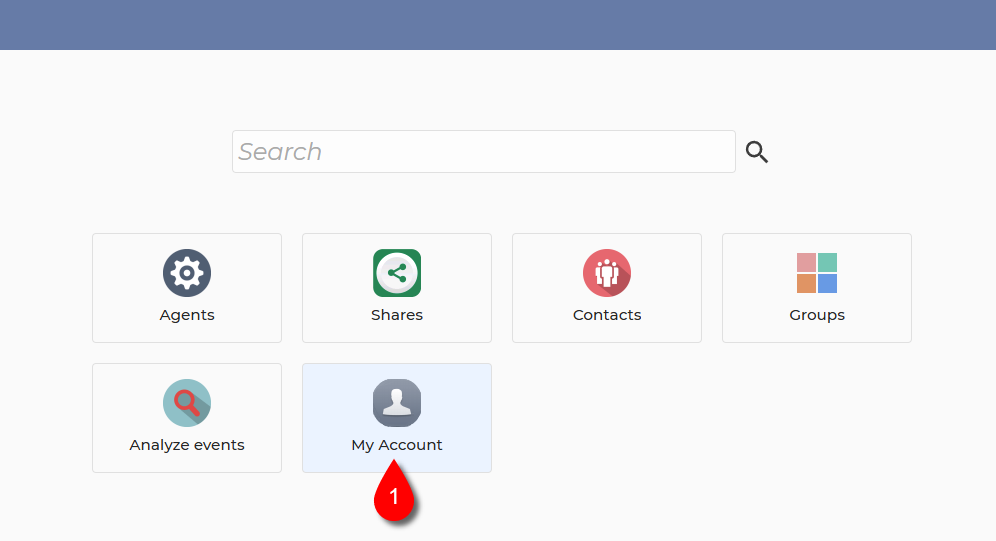
After logging into your account, your Dashboard will appear:

1. Select My Account.

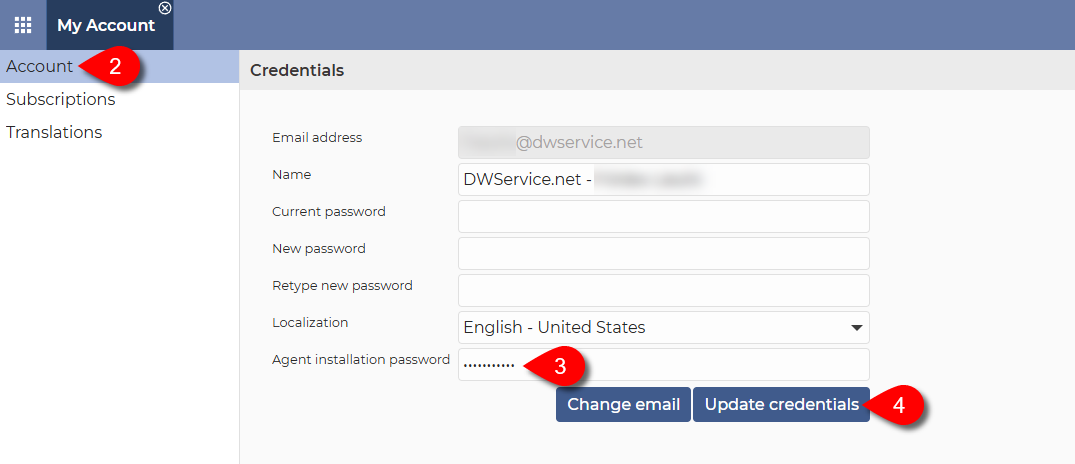
2. From the menu on the left, select the Account menu item.

3. In the Credentials section, enter the password in the Agent installation password field.

⚠️ Important: When entering/updating the Agent installation password, only fill in the Agent installation password field and leave the other password fields (Current password, New password and Retype new password) blank. As shown in the screenshot above.

ℹ️ There is no password strength check in the Agent installation password field, meaning that you can enter a password of any length and strength.

⚠️ Important: For security reasons, the Agent installation password must be different from the account password.

4. Click on the Update credentials button.

✅ After that, you can use this password when installing your Agents.

Watch our related video on How to install the Agent with credentials:

Credentials

Credentials at Sign-up:

Credentials at Login:

  • Username (e-mail address)
  • Password
  • If Two-Factor Authentication is enabled, then TOTP (Time-based One-Time Password)

Credentials at Agent installation:

Watch our tutorial video on How to create an Account:

Watch our tutorial video on How to activate TOTP (2FA):

Watch our tutorial video on How to install the Agent with credentials:

Videos

If you have a question or a problem with our service, we have several videos available on our YouTube channel. You are very likely to find the right answer in them.

The videos are available on the DWService YouTube channel: https://www.youtube.com/c/DWService

Our aim with the How to … videos is to give you the most straightforward answers possible about how to use our service.

Please do not hesitate to Subscribe to our channel and leave your comments below the videos. And feel free to share your feedback and what tutorials you would like to see on this channel so that we can answer the questions that arise.

All feedback is welcome at: feedback@dwservice.net

FAQ

Frequently Asked Questions

We collected the most frequently asked questions into one group.

If you encounter a problem or have a question, please check this section first to see if you can find the answer you need.

The FAQ is available at: https://www.dwservice.net/faq.html