
ℹ️ When installing an Agent with credentials, it is necessary to properly verify the identity of the user. To do this, you will need to provide your username (email address) and the Installation password.
After logging into your account, your Dashboard will appear:
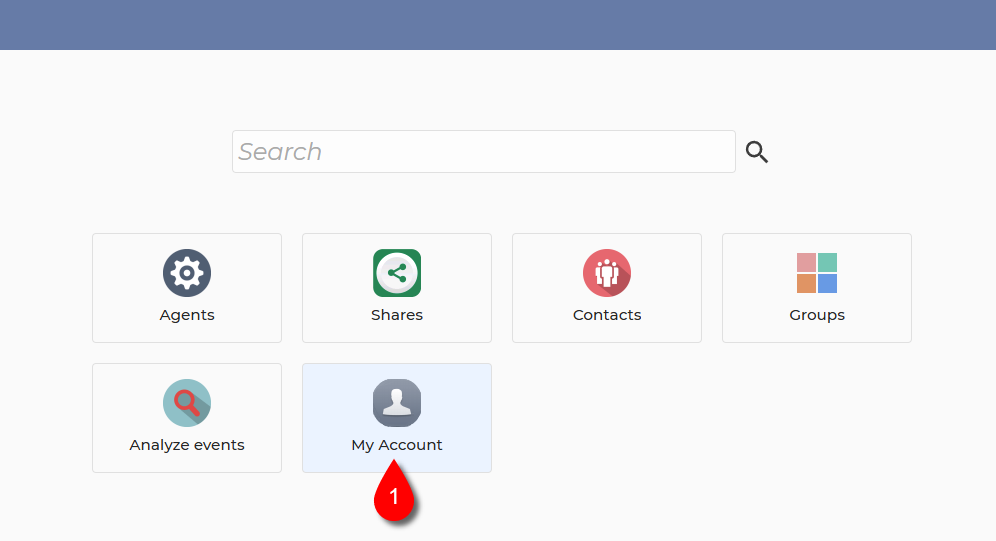
1. Select My Account.
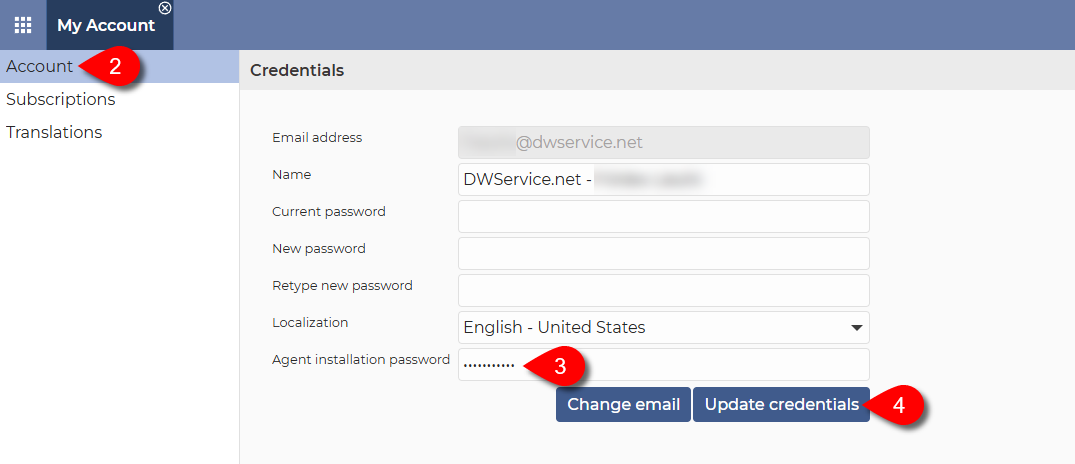
2. From the menu on the left, select the Account menu item.
3. In the Credentials section, enter the password in the Agent installation password field.
⚠️ Important: When entering/updating the Agent installation password, only fill in the Agent installation password field and leave the other password fields (Current password, New password and Retype new password) blank. As shown in the screenshot above.
ℹ️ There is no password strength check in the Agent installation password field, meaning that you can enter a password of any length and strength.
⚠️ Important: For security reasons, the Agent installation password must be different from the account password.
4. Click on the Update credentials button.
✅ After that, you can use this password when installing your Agents.
Watch our related video on How to install the Agent with credentials: